Prepare for an AD schema update.
This application runs a sequence of tests verifying the conditions that must be met for a successful schema update. Depending on the access level of the user running the application some of the tests may fail, others may succeed but the result might indicate that a required condition is not being met.
SchemaDiag is most useful to users in the process of deploying schema updates. If the tool is unable to perform all the tests or if any tests return negative results it is very unlikely that the real schema extension succeeds.
Explore the diagnostic checks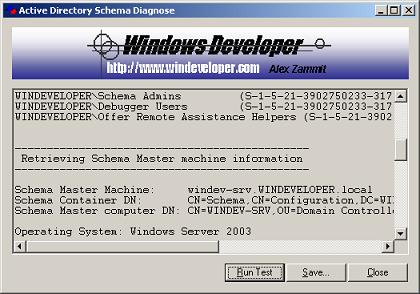
Diagnostic checks
The application performs the following sequence of tests:
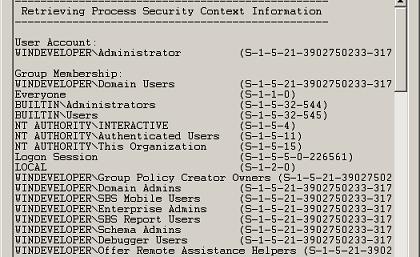
1. Security context and group membership
Retrieval of the security context information under which the application is running. It logs the account for the user running the application and its security group membership. This enables visual verification of membership to the 'Schema Admins' group, a requirement for a user to extend the schema.
2. Schema master details
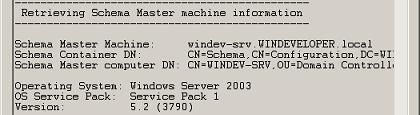
Retrieval of the schema master machine details:- Schema Master Machine name
- AD schema container distinguished name
- AD Schema Master machine object distinguished name.
- Schema Master Operating System version/Service Pack installed.
3. LDAP connectivity
Testing of LDAP connectivity to the schema master machine. The test verifies if the machine running the Diagnostic tool is able to directly connect to the schema master which connectivity is required for a schema update.
4. Registry access
Testing of schema master machine registry access. Machines running Windows 2000 require enabling of schema updates through registry. Hence the tool verifies whether schema updates are enabled and whether the user has the necessary rights to set the 'Schema Update Allowed' registry value.
5. Schema container permissions
Verification of the access level the user has on the AD schema container. Whereas the first test enables visual inspection for the 'Schema Admins' security group, this test determines the exact access level and the set of rights the user is granted on the schema container.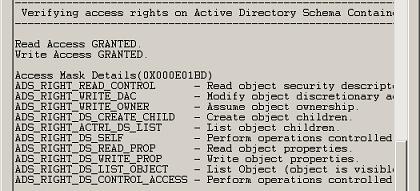
Installing/Using the application
Minimum requirements:
Any Windows platform from:
- Windows Server 2003/2008
- Small Business Server SBS 2003/2008/2011
- Windows XP/Vista/Windows 7
There is little to say on using this application, just download and run the executable. The tests will run automatically. You may then save the results to disk. The application runs under the user's security context. You may use runas to switch between different users.